Redis Config Section

redis-cli를 통해서 redis console에 진입 할 경우 info명령어를 통해서 다음 section에 대한 정보를 획득 할 수있다.

info <<아래 명령어>>

  • server : 기본 정보
  • clients : client의 접속 정보
  • memory : 메모리 사용 관련 정보
  • persistence : RDB와 AOF(Append Only File) 관련 정보

AOF의 경우는 appendonly.aof 파일에 입력/수정/삭제 실행 명령 실행시 마다 기록 (조회 제외)

Redis 서버 작동시 FLUSHALL명령을 사용한 경우 해당 파일을 이용해서 DB를 재 구축 할 수 있음

http://redisgate.kr/redis/configuration/persistence.php

RDB의 경우에는 현재 메모리에 있는 redis data를 특정 시점을 기준으로 파일로 write 한 일종의 backup 파일 또는 스냅샷으로 생각 하면 된다.

  • stats : 일반 통계 정보
  • replication : Master, Slave간에 데이터 복사에 대한 설정
  • cpu : cpu 사용 통계
  • commandstats : redis에 command를 처리한 통계
  • cluster : redis cluster에 대한 설정 (master, slave 등)
  • keyspace : database 관련 통계

server

redis_version : redis 서버 버전
redis_git_sha1 : git sha1 (?)
redis_git_dirty : git dirty flag (?)
redis_build_id

소스로 부터 redis를 빌드한 id

redis_mode

standalone : 독립적으로 동작

sentinel : sentinel에 의해 모니터링 되고 관리됨

cluster : redis간 clustering 처리

os
arch_bits

32bits or 64bits

multiplexing_api (?)

evnet loop 메카니즘

process_id

서버 PID

tcp_port

TCP/IP 리슨포트 (6379 기본 포트)

uptime_in_seconds

redis server 작동 후 시간

uptime_in_days

redis server 작동 후 일자

lru_clock

LRU 알고리즘을 위한 시간 (매분 마다 증가함)

Least Recently Used 가장 오랫동안 접근 되지 않은 키의 데이터를 삭제한다는 의미

excutable

실행 파일 위치

config_file

환경 설정 파일 위치

clients

connected_clients

현재 접속 되어 있는 clients 개수 (replicas를 통한 접근 제외)

client_longest_output_list

현재 접속되어 있는 clients 중에 가장 오래 output(? 가장 오래 접속 하고 있는 의미로 보임)하고 있는 list

client_biggest_input_buf

현재 접속되어있는 clients 중에 가장 큰 input buffer를 넣고 있는 connection

blocked_clients

blocking call(BLPOP, BRPOP, BRPOPLPUSH)에 의해 blocked 되어있는 client 개수

BLPOP(리스트의 처음), BRPOP(리스트의 마지막),BRPOPLPUSH (원본 마지막으로 대상 리스트의 첫번째로 입력) 명령어의 경우 기본적으로 blocking 모드 작동을 한다. 즉, 해당 command가 작동 중에는 다음 command는 blocking 되게 된다.

memory

used_memory

redis가 사용중인 총 메모리양

used_memory_human

사람이 읽을 수있는 메모리양 표시 (G로 표시한다)

used_memory_rss

OS상에서 사용중인 메모리양

일반적으로 해당 솔루션에서 사용된 메모리양 + shared 메모리양의 총합으로

used memory 보다 크다

used_memory_rss_human

사람이 읽을 수 있는 메모리양 표시 (G로 표시한다)

used_memory_peak

바이트 단위로 메모리가 peak에 있을 때 사용량

used_memory_peak_perc

used_memory 대비 used_memory의 퍼센트 (peak이 더 높다)

used_memory_overhead

모든 overheads에 대한 바이트 합

used_memory_startup

redis가 start하는 시점에 사용된 전체 메모리양

used_memory_dataset

dataset의 바이트 단위 사이즈

maxmemory

설정된 최대 메모리

32bit의 경우는 3G

64bit의 경우는 0 (unlimit로 처리 되는 것으로 보임)

maxmemory_policy
  • noeviction : memory의 limit에 접근하면 에러를 낸다
  • allkeys-lru : 신규 데이터 입력시 key를 기반으로 LRU 알고리즘 적용
  • volatile-lru : allkeys-lru와 같은 조건이나, expire set이 있는 경우만 대상으로 함

EXPIRE (https://redis.io/commands/expire) 명령어로 지정된 key를 대상으로만 하는 것으로 보임

  • allkeys-random : random으로 삭제(진짜?)
  • volatile-random : expire set이 있는 경우만 random으로 삭제
  • volatile-ttl : expire set의 ttl을 확인 후 최우선으로 삭제

https://redis.io/topics/lru-cache

persistence

loading

dump 파일이 로딩 중인지 표시 한다 (평소에는 0이다가 로딩하게 되면 1로 변화하는 것으로 보인다)

rdb_changes_since_last_save

마지막 dump 후 변경된 횟수

rdb_last_save_time

epoch 기준으로 마지막 성공한 저장 시점

aof_enabled

aof 설정 여부 (0 false)

replication

role

master or slave

master_replid

redis server replication ID

master_repl_offset

현재 서버의 replication offset

Redis Sentinel 사용시 수시 Disconnect가 발생하는 경우

sentinel down-after-milliseconds mymaster 3000

설정을 확인한다.

상위에서 마지막 부분에 있는 3000은 3초를 의미 한다. 이를 매우 작게 사용한다면 Redis간 Sync시 Disconnect를 감지하고 Master Slave 전환을 처리 하게 된다. 일반적으로 3초에서 5초 사이로 설정해 놓고 쓰면된다.

Reids Sync 처리 프로세스를 실행하기 전에 Master에서 BGSAVE처리를 하게 된다. BGSAVE는 메모리 데이터를 파일로 Write하는 행동인데, 이때 Redis 소스 내부적으로 Slave와 Disconnect를 처리 한다. 이 순간의 단절 상황을 Sentinel에서 감지하게 되는 문제이다.

client-output-buffer-limit

client-output-buffer-limit normal 0 0 0
client-output-buffer-limit slave 256mb 64mb 60
client-output-buffer-limit pubsub 32mb 8mb 60

Redis와 Slave 간의 데이터 이동 양을 정하는 부분이다

client-output-buffer-limit slave 256mb 64mb 60

  • hard : 최대 256mb의 데이터를 송수신 할 수 있다. 넘어가면 Disconnect가 발생한다.
  • Soft : 64mb 데이터를 60초 동안 이동 시킨다. 넘어가면 Disconnect가 발생한다.

Android에서 Keyboard 작동을 위한 요소

  • Input Method Manager : 클라이언트 Side의 application context에 위치 하면서 Android 전체 시스템 상 프로세스 간의 통로 역할을 한다
  • Input Method (IME & Keyboard) : 쉽게 keyboard라고 생각하면 된다. 사용자의 text를 생성하고 입력할 수있게 하는 역할을 한다. IME는 오직 한번에 하나만 화면에 표시 될 수있다.
  • Client Application : IME을 사용하는 대상 application이 되며, 한번에 오직 하나의 입력 화면(소스를 보면 View라고 생각된다)과 Active 상태를 유지 할 수있다.
InputMethd Framework (IMF) 의 보안적 제한

Input Method의 경우 사용자의 모든 입력을 확인 할 수있기 때문에, 보안적인 제한이 걸려있다.

  • IME interface 접근 : 오직 Manifest.permission.BIND_INPUT_METHOD 권한을 통해서만 접근 가능
  • Clinet는 Input method를 사용할때 InputMethodSession 인터페이스에서 주어진 Access를 통해서만 가능하다. 아래 코드는 InputMethodManager의 코드 일부분이다 이때 windowToken을 통해 hide 시킬 권한을 얻어오는 것을 볼 수있다
public boolean hideSoftInputFromWindow(IBinder windowToken, int flags) {
return hideSoftInputFromWindow(windowToken, flags, null);
}
  • Input Method는 화면이 off 되어있는 상태에서 절대로 사용될 수 없다.
  • 신규 IME를 인스톨 할경우 IME의 변환은 반듯이 사용자의 손에 의해서 만 변경 될 수있다.

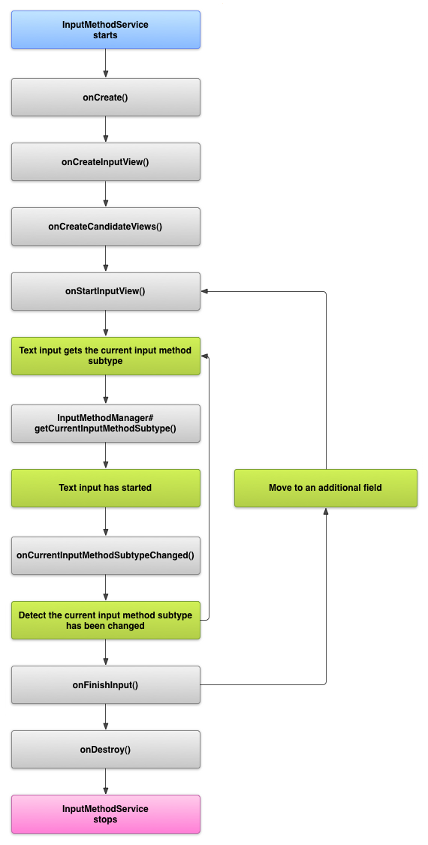
IME의 Lifecycle

이하 Lifecycle은 InputMethodService : https://developer.android.com/reference/android/inputmethodservice/InputMethodService가 작동하는 순서를 나타내고 있다

  • onCreateInputView() : 사용자 입력을 받기 위해 View를 init한다. (여기서 init되는 화면은 단순히 softkey 뿐만이 아닌 Draw 입력 등도 포함된다) User interface의 생성이라고 생각하면 될 듯 하다. 아래 코드는 IMS를 Override하여 어떻게 UI를 생성하는지 보여주는 예이다.

    public View onCreateInputView() {
    if (mKeyboardView != null) {
    mKeyboardView.closing();
    }

    updateKeyboardThemeAndContextThemeWrapper(
    mLatinIME, KeyboardTheme.getKeyboardTheme(mLatinIME /* context */));
    mCurrentInputView = (InputView)LayoutInflater.from(mThemeContext).inflate(
    R.layout.input_view, null);
    mMainKeyboardFrame = mCurrentInputView.findViewById(R.id.main_keyboard_frame);

    mKeyboardView = (MainKeyboardView) mCurrentInputView.findViewById(R.id.keyboard_view);
    mKeyboardView.setKeyboardActionListener(mLatinIME);
    return mCurrentInputView;
    }
  • onEvaluateInputViewShown() : hard keyboard 등이 달려 있는 단말의 경우 soft keyboard가 보일 필요가 없다. 이와같이 keyboard를 사용자에게 보여줄지를 확인 하는 메서드이다. (물론 softkeyboard가 열려 있다면 return 은 true가 될 것이다)
    아래는 IMS의 code이다. false가 return 되면 사용자에게 보여주면 된다.

    public boolean onEvaluateInputViewShown() {
    if (mSettingsObserver == null) {
    Log.w(TAG, "onEvaluateInputViewShown: mSettingsObserver must not be null here.");
    return false;
    }
    if (mSettingsObserver.shouldShowImeWithHardKeyboard()) {
    return true;
    }
    Configuration config = getResources().getConfiguration();
    return config.keyboard == Configuration.KEYBOARD_NOKEYS
    || config.hardKeyboardHidden == Configuration.HARDKEYBOARDHIDDEN_YES;
    }
  • onStartInput() & onStartInputView() : text 입력의 시작을 알리는 부분으로, 해당 메서드의 call 순서는 onStartInput이 일어나고 그다음에 onStartInputView가 Call되게 된다. 해당 Call의 순서처리에 따라서 lifecycle이 다소 달라지는데 해당 내용은 "Webview에서의 Keyboard 처리"에서 상세하게 다룰것이다. IMS에서는 doStartInput이 발생할 경우 onStartInput을 요청하고 이후에 InputView를 call하는 것을 확인 할 수 있다.

    void doStartInput(InputConnection ic, EditorInfo attribute, boolean restarting) {
    if (!restarting) {
    doFinishInput();
    }
    mInputStarted = true;
    mStartedInputConnection = ic;
    mInputEditorInfo = attribute;
    initialize();
    if (DEBUG) Log.v(TAG, "CALL: onStartInput");
    onStartInput(attribute, restarting);
    if (mWindowVisible) {
    if (mShowInputRequested) {
    if (DEBUG) Log.v(TAG, "CALL: onStartInputView");
    mInputViewStarted = true;
    onStartInputView(mInputEditorInfo, restarting);
    startExtractingText(true);
    } else if (mCandidatesVisibility == View.VISIBLE) {
    if (DEBUG) Log.v(TAG, "CALL: onStartCandidatesView");
    mCandidatesViewStarted = true;
    onStartCandidatesView(mInputEditorInfo, restarting);
    }
    }
    }

onStartInput과 onStartInputView의 차이점을 문서 상으로 확인하기는 쉽지 않다. 코드상으로 보면 onStartInput의 경우는 Local과 같은 설정, onStartInputView는 실제로 보여줄 keyboard에 대한 모든 설정을 처리 하는 것으로 보인다.

Webview에서의 Keyboard 처리

Webview를 이용한 키보드 처리는 크게 3가지로 나눌 수 있다.

  • Webview에서 load된 html의 input 입력시 자동으로 IME Show
  • Webview의 public InputConnection onCreateInputConnection(EditorInfo outAttrs) {을 Override 시켜서 특정 키보드 환경을 지정
  • showSoftInput을 활용 하는 방법
onCreateInputConnection() Override

android.webkit.Webview 객체를 override 하면 된다.

package com.example.app;
...
public class BaseWebView extends WebView {

...

@Override
public InputConnection onCreateInputConnection(EditorInfo outAttrs) {
InputConnection ic = super.onCreateInputConnection(outAttrs);


int original = outAttrs.imeOptions;

int notMask = ~EditorInfo.IME_MASK_ACTION;

int maskResult = original & notMask;

if((outAttrs.inputType & EditorInfo.TYPE_MASK_CLASS) == EditorInfo.TYPE_CLASS_NUMBER){
Log.d(TAG,"IME Options is Number");
outAttrs.privateImeOptions="defaultInputmode=numeric;";
} else {
Log.d(TAG,"IME Options is English");
outAttrs.privateImeOptions="defaultInputmode=english;";
}

return ic;
}

InputConnection ic = super.onCreateInputConnection(outAttrs);이 부분은 반듯이 첫번째 code로 와야 한다. 해당 코드가 최초로 오지 않게 되면 load된 html이 어떤 input tag를 focus하고 있는지 알 수가 없게 된다. 이 코드를 통과 하고 나야 비로소 EditorInfo에 의미 있는 값들이 저장되게 된다.

이때 개발자가 확인 가능한 값은 2가지가 있는데 imeOptionsinputType인데

  • imeOptions는 IME가 어떤 형태로 표현될지 어떤 기능을 제공할지에 대한 표현을 제공한다. 해당 값에 대한 표현 방법은 EditorInfo.IME_MASK_ACTION을 기준으로 Action 처리와 FLAG 처리로 분리 된다.
    • Action : GO, NEXT, NONE, PREVIOUS, SEARCH, SEND 등 엔터 버튼에 대한 기능을 정의하게 된다.
    • Flag : ASCII, NAVIGATE,ACCESSORY,NO_ENTER,EXTRACT, FULLSCREEN 등 키보드의 형태를 나타낸다

상위 값들에 대한 정확한 OPTION은 다음 페이지를 참조 해야하나, 실질적으로 해당 Options을 모두 적용한 IME가 많지는 않다.

일단 해당 값들에 대한 마스킹 방법은 다음과 같이 처리 하면된다.

  • FLAG 값을 읽어 올 수있는 방법 (Webview를 이용해서는 해당 옵션을 얻어 올수 없었다.) 비록 html style에 ime-mode가 있다고는 하지만 이와는 관련점이 없었다
int original = outAttrs.imeOptions;
int notMask = ~EditorInfo.IME_MASK_ACTION;
int flag = original & notMask;

ime-mode는 크롬등에서 호환되지 않고, deprecated 된 기능이다

  • Action 값을 읽어 올수 있는 방법 (역시 Webview에서는 의미 있는데이터를 얻어 올 수 없었다)
int action = original & EditorInfo.IME_MASK_ACTION;

결과적으로 이시점에 개발자가 처리 할 수있는 값은 inputType이다. 해당 값은 다음과 같은 코드로 읽어 올 수있다.

int inputType = outAttrs.inputType & EditorInfo.TYPE_MASK_CLASS

MASK로 얻어올수 있는 값은 text, number, phone, datetime 정도이고 webview에서 의미 있는 값은 text와 number 정도가 될 것이다.

TYPE_CLASS_TEXT, TYPE_CLASS_NUMBER, TYPE_CLASS_PHONE, TYPE_CLASS_DATETIME

아래 코드는 inputType을 바탕으로 어떤 keyboard를 표현 하게 할지 나타내는 코드이다.

if((outAttrs.inputType & EditorInfo.TYPE_MASK_CLASS) == EditorInfo.TYPE_CLASS_NUMBER)     {
Log.d(TAG,"IME Options is Number");
...
} else {
Log.d(TAG,"IME Options is English");
...
}

그러나 상위와 같은 코드는 아주 특별한 경우를 제외하고는 사용하지 않는다. 그 이유는 어떤 종류의 keyboard를 보여 줄지를 정의 하는건 IME의 onStartInputView내부에서 처리가 될것이기 때문이다.

일반적으로 onCreateInputConnection을 사용하는 이유는 IME로 넘어 가기전에 EditorInfo를 수정하기 위해서이다. 예를 들자면 outAttrs.inputType에 EditorInfo.TYPE_CLASS_NUMBER를 주입하게 되면 해당 webview를 사용한 html은 number type의 키보드만 보게 되는 것이다.

InputMethodManager를 이용한 showSoftInput처리
InputMethodManager imm = (InputMethodManager) getSystemService(Context.INPUT_METHOD_SERVICE);
imm.showSoftInput(mWebView, 0);

InputMethodManager를 시스템 서비스에서 직점 instance를 얻어와서 특정 view (여기서는 mWebView)와 IME를 연결시키는 코드이다. 해당 코드는 Webview상 어떤 html element와 access를 해야할지 알기가 어렵기 때문에 어떤 keyboard를 강제로 뛰울 수가 없다.

비록 Webview를 상속 받아서 onCreateInputConnection()을 재정의 한다고 하더라도 이경우에는 해당 Method를 타지 않는다. 그렇기 때문에 EditorInfo 역시 추출 할 수가 없는 상태가 된다. 이렇다 보니 무조건 default keyboard만 나타나게 되는데, 이 부분을 해결 하는 방법은 webview에 inputType을 추가 해주는 것이다.

public class BaseWebView extends WebView {

int inputType = EditorInfo.TYPE_NULL;

public void setInputType(int type) {
inputType = type;
}

public int getInputType() {
return inputType;
}

그리고 해당 내용을 아래와 같이 추가해 준다.

InputMethodManager imm = (InputMethodManager) getSystemService(Context.INPUT_METHOD_SERVICE);
mWebView.setInputType(InputType.TYPE_CLASS_NUMBER);
imm.showSoftInput(mWebView, 0);

onStartInputView에서 inputType을 확인 한 후 number keyboard를 보여 주게 될것이다.

imeOptions나 다른 파라메터들은 상위와 같이 강제 Setting을 해도 keyboard에 별다를 영향을 주지 못했다.

Keyboard 처리에 대한 IME Call Flow

사실 상위 두 가지의 Call Flow가 다를 거라고 크게 생각하지 못했으나 의외로 전혀 다른 process를 타고 있었다.

아래는 https://github.com/rkkr/simple-keyboard의 소스에 Log를 붙여서 어떤 flow를 trace한 표이다.

html에서 input tag를 눌러서 keyboard 표시 했을 때

//input을 이용한 show
05-24 09:53:41.362 13828 13828 D LatinIME: onStartInput = 24578: rkr.simplekeyboard.inputmethod
05-24 09:53:41.362 13828 13828 D LatinIME: onStartInput editorInfo.inputyType 24578: rkr.simplekeyboard.inputmethod
05-24 09:53:41.363 13828 13828 D LatinIME: executePendingImsCallback editorInfo.inputyType 24578: rkr.simplekeyboard.inputmethod
05-24 09:53:41.363 13828 13828 D LatinIME: onStartInputInternal editorInfo inputType24578: rkr.simplekeyboard.inputmethod
05-24 09:53:41.364 13828 13828 D LatinIME: onShowInputRequested: rkr.simplekeyboard.inputmethod
05-24 09:53:41.364 13828 13828 D LatinIME: isImeSuppressedByHardwareKeyboard: rkr.simplekeyboard.inputmethod
05-24 09:53:41.364 13828 13828 D LatinIME: onEvaluateFullscreenMode: rkr.simplekeyboard.inputmethod
05-24 09:53:41.364 13828 13828 D LatinIME: isImeSuppressedByHardwareKeyboard: rkr.simplekeyboard.inputmethod
05-24 09:53:41.371 13828 13828 D LatinIME: updateFullscreenMode: rkr.simplekeyboard.inputmethod
05-24 09:53:41.371 13828 13828 D LatinIME: updateSoftInputWindowLayoutParameters: rkr.simplekeyboard.inputmethod
05-24 09:53:41.375 13828 13828 D LatinIME: onStartInputView: rkr.simplekeyboard.inputmethod
05-24 09:53:41.376 13828 13828 D LatinIME: executePendingImsCallback editorInfo.inputyType 24578: rkr.simplekeyboard.inputmethod
05-24 09:53:41.395 13828 13828 I LatinIME: Starting input. Cursor position = 1,1: rkr.simplekeyboard.inputmethod
05-24 09:53:41.395 13828 13828 D LatinIME: onEvaluateFullscreenMode: rkr.simplekeyboard.inputmethod
05-24 09:53:41.395 13828 13828 D LatinIME: isImeSuppressedByHardwareKeyboard: rkr.simplekeyboard.inputmethod
05-24 09:53:41.395 13828 13828 D LatinIME: updateFullscreenMode: rkr.simplekeyboard.inputmethod
05-24 09:53:41.395 13828 13828 D LatinIME: updateSoftInputWindowLayoutParameters: rkr.simplekeyboard.inputmethod
05-24 09:53:41.396 13828 13828 D LatinIME: isImeSuppressedByHardwareKeyboard: rkr.simplekeyboard.inputmethod
05-24 09:53:41.411 13828 13828 D LatinIME: loadSettings: rkr.simplekeyboard.inputmethod
05-24 09:53:41.422 13828 13828 D LatinIME: getCurrentAutoCapsState: rkr.simplekeyboard.inputmethod
05-24 09:53:41.422 13828 13828 D LatinIME: getCurrentRecapitalizeState: rkr.simplekeyboard.inputmethod
05-24 09:53:41.426 13828 13828 D LatinIME: shouldShowLanguageSwitchKey: rkr.simplekeyboard.inputmethod
05-24 09:53:41.487 13828 13828 D LatinIME: onComputeInsets: rkr.simplekeyboard.inputmethod
05-24 09:53:41.487 13828 13828 D LatinIME: isImeSuppressedByHardwareKeyboard: rkr.simplekeyboard.inputmethod
05-24 09:53:41.498 13828 13828 D LatinIME: onComputeInsets: rkr.simplekeyboard.inputmethod
05-24 09:53:41.498 13828 13828 D LatinIME: isImeSuppressedByHardwareKeyboard: rkr.simplekeyboard.inputmethod


//input hide
05-24 09:54:38.197 13828 13828 D LatinIME: hideWindow: rkr.simplekeyboard.inputmethod
05-24 09:54:38.197 13828 13828 D LatinIME: isShowingOptionDialog: rkr.simplekeyboard.inputmethod
05-24 09:54:38.197 13828 13828 D LatinIME: onFinishInputView: rkr.simplekeyboard.inputmethod
05-24 09:54:38.197 13828 13828 D LatinIME: onFinishInputViewInternal: rkr.simplekeyboard.inputmethod
05-24 09:54:38.200 13828 13828 D LatinIME: onWindowHidden: rkr.simplekeyboard.inputmethod
05-24 09:54:38.202 13828 13828 D LatinIME: updateFullscreenMode: rkr.simplekeyboard.inputmethod
05-24 09:54:38.202 13828 13828 D LatinIME: updateSoftInputWindowLayoutParameters: rkr.simplekeyboard.inputmethod
05-24 09:54:38.230 13828 13828 D LatinIME: onComputeInsets: rkr.simplekeyboard.inputmethod
05-24 09:54:38.230 13828 13828 D LatinIME: isImeSuppressedByHardwareKeyboard: rkr.simplekeyboard.inputmethod
showSoftInput을 처리 했을 때

//keyboard show
05-24 09:48:48.369 13828 13828 D LatinIME: onShowInputRequested: rkr.simplekeyboard.inputmethod
05-24 09:48:48.369 13828 13828 D LatinIME: isImeSuppressedByHardwareKeyboard: rkr.simplekeyboard.inputmethod
05-24 09:48:48.369 13828 13828 D LatinIME: onEvaluateFullscreenMode: rkr.simplekeyboard.inputmethod
05-24 09:48:48.369 13828 13828 D LatinIME: isImeSuppressedByHardwareKeyboard: rkr.simplekeyboard.inputmethod
05-24 09:48:48.370 13828 13828 D LatinIME: updateFullscreenMode: rkr.simplekeyboard.inputmethod
05-24 09:48:48.370 13828 13828 D LatinIME: updateSoftInputWindowLayoutParameters: rkr.simplekeyboard.inputmethod
05-24 09:48:48.371 13828 13828 D LatinIME: onStartInputView: rkr.simplekeyboard.inputmethod
05-24 09:48:48.372 13828 13828 D LatinIME: executePendingImsCallback editorInfo.inputyType 49313: rkr.simplekeyboard.inputmethod
05-24 09:48:48.382 13828 13828 I LatinIME: Starting input. Cursor position = 0,0: rkr.simplekeyboard.inputmethod
05-24 09:48:48.382 13828 13828 D LatinIME: onEvaluateFullscreenMode: rkr.simplekeyboard.inputmethod
05-24 09:48:48.382 13828 13828 D LatinIME: isImeSuppressedByHardwareKeyboard: rkr.simplekeyboard.inputmethod
05-24 09:48:48.383 13828 13828 D LatinIME: updateFullscreenMode: rkr.simplekeyboard.inputmethod
05-24 09:48:48.383 13828 13828 D LatinIME: updateSoftInputWindowLayoutParameters: rkr.simplekeyboard.inputmethod
05-24 09:48:48.383 13828 13828 D LatinIME: isImeSuppressedByHardwareKeyboard: rkr.simplekeyboard.inputmethod
05-24 09:48:48.395 13828 13828 D LatinIME: loadSettings: rkr.simplekeyboard.inputmethod
05-24 09:48:48.402 13828 13828 D LatinIME: getCurrentAutoCapsState: rkr.simplekeyboard.inputmethod
05-24 09:48:48.402 13828 13828 D LatinIME: getCurrentRecapitalizeState: rkr.simplekeyboard.inputmethod
05-24 09:48:48.404 13828 13828 D LatinIME: shouldShowLanguageSwitchKey: rkr.simplekeyboard.inputmethod
05-24 09:48:48.440 13828 13828 D LatinIME: onComputeInsets: rkr.simplekeyboard.inputmethod
05-24 09:48:48.440 13828 13828 D LatinIME: isImeSuppressedByHardwareKeyboard: rkr.simplekeyboard.inputmethod
05-24 09:48:48.452 13828 13828 D LatinIME: onComputeInsets: rkr.simplekeyboard.inputmethod
05-24 09:48:48.452 13828 13828 D LatinIME: isImeSuppressedByHardwareKeyboard: rkr.simplekeyboard.inputmethod

//keyboard hide
05-24 09:52:19.722 13828 13828 D LatinIME: hideWindow: rkr.simplekeyboard.inputmethod
05-24 09:52:19.723 13828 13828 D LatinIME: isShowingOptionDialog: rkr.simplekeyboard.inputmethod
05-24 09:52:19.723 13828 13828 D LatinIME: onFinishInputView: rkr.simplekeyboard.inputmethod
05-24 09:52:19.723 13828 13828 D LatinIME: onFinishInputViewInternal: rkr.simplekeyboard.inputmethod
05-24 09:52:19.725 13828 13828 D LatinIME: onWindowHidden: rkr.simplekeyboard.inputmethod
05-24 09:52:19.728 13828 13828 D LatinIME: updateFullscreenMode: rkr.simplekeyboard.inputmethod
05-24 09:52:19.728 13828 13828 D LatinIME: updateSoftInputWindowLayoutParameters: rkr.simplekeyboard.inputmethod
05-24 09:52:19.748 13828 13828 D LatinIME: onComputeInsets: rkr.simplekeyboard.inputmethod
05-24 09:52:19.748 13828 13828 D LatinIME: isImeSuppressedByHardwareKeyboard: rkr.simplekeyboard.inputmethod

테스트 mp4파일 받기

com.android.grafika

    public static void initialize(Context context) {
ContentManager mgr = getInstance();
synchronized (sLock) {
if (!mgr.mInitialized) {
+ mgr.mFilesDir = context.getExternalFilesDir(Environment.DIRECTORY_MOVIES);
- // mgr.mFilesDir = context.getFilesDir();
mgr.mContent = new ArrayList<Content>();
mgr.mInitialized = true;
}
}
}

app 인터널 storage를 external로 변경

앱 재실행 후 파일 다운로드 표시 끝나면 android file explore를 이용해서

sdcard> Android > data > com.google.grafica > files > Movies

이하를 조회하면,

  • gen-eight-rects.mp4
  • gen-sliders.mp4

파일 확인 가능함

MediaFormat

비디오 파일(예, mp4)등의 header를 분석한 결과 MediaExtractor를 통해서 정보를 추출할 수 있음

아래 소스는 android app 내의 res>raw 이하에 비디오나 오디오 파일을 위치 시켰을 때 uri 방식으로 수신 할 수 있는 코드이다.

관련 수정사항은 extractor.setDataSource(ctx,uri,null); 이 부분 전후를 보면 된다.

해당 메서드를 요청하는 방법은 Activity에서 아래와 같이 call 하면 된다

player = new MoviePlayer(getApplicationContext(), Uri.parse("android.resource://"+getPackageName()+"/raw/gen_eight_rects"), surface, callback);

MoviePlayer.java

    public MoviePlayer(Context ctx, Uri uri, Surface outputSurface, FrameCallback frameCallback) throws IOException {
mContext = ctx;
mUri = uri;
// mSourceFile = sourceFile;
mOutputSurface = outputSurface;
mFrameCallback = frameCallback;

// Pop the file open and pull out the video characteristics.
// TODO: consider leaving the extractor open. Should be able to just seek back to
// the start after each iteration of play. Need to rearrange the API a bit --
// currently play() is taking an all-in-one open+work+release approach.
MediaExtractor extractor = null;
try {
extractor = new MediaExtractor();
extractor.setDataSource(ctx,uri,null);
int trackIndex = selectTrack(extractor);
if (trackIndex < 0) {
throw new RuntimeException("No video track found in " + mSourceFile);
}
extractor.selectTrack(trackIndex);

MediaFormat format = extractor.getTrackFormat(trackIndex);
mVideoWidth = format.getInteger(MediaFormat.KEY_WIDTH);
mVideoHeight = format.getInteger(MediaFormat.KEY_HEIGHT);
if (VERBOSE) {
Log.d(TAG, "Video size is " + mVideoWidth + "x" + mVideoHeight);
}
} finally {
if (extractor != null) {
extractor.release();
}
}
}

/**
* Returns the width, in pixels, of the video.
*/
public int getVideoWidth() {
return mVideoWidth;
}

/**
* Returns the height, in pixels, of the video.
*/
public int getVideoHeight() {
return mVideoHeight;
}

/**
* Sets the loop mode. If true, playback will loop forever.
*/
public void setLoopMode(boolean loopMode) {
mLoop = loopMode;
}

/**
* Asks the player to stop. Returns without waiting for playback to halt.
* <p>
* Called from arbitrary thread.
*/
public void requestStop() {
mIsStopRequested = true;
}

/**
* Decodes the video stream, sending frames to the surface.
* <p>
* Does not return until video playback is complete, or we get a "stop" signal from
* frameCallback.
*/
public void play() throws IOException {
MediaExtractor extractor = null;
MediaCodec decoder = null;

boolean fileBased = true;
// The MediaExtractor error messages aren't very useful. Check to see if the input
// file exists so we can throw a better one if it's not there.
if (mSourceFile != null && !mSourceFile.canRead()) {
throw new FileNotFoundException("Unable to read " + mSourceFile);
} else {
fileBased = false;
}

try {
extractor = new MediaExtractor();
// extractor.setDataSource(mSourceFile.toString());
extractor.setDataSource(mContext,mUri,null);


int trackIndex = selectTrack(extractor);
if (trackIndex < 0) {
throw new RuntimeException("No video track found in " + mSourceFile);
}
extractor.selectTrack(trackIndex);

MediaFormat format = extractor.getTrackFormat(trackIndex);

// Create a MediaCodec decoder, and configure it with the MediaFormat from the
// extractor. It's very important to use the format from the extractor because
// it contains a copy of the CSD-0/CSD-1 codec-specific data chunks.
String mime = format.getString(MediaFormat.KEY_MIME);
decoder = MediaCodec.createDecoderByType(mime);
decoder.configure(format, mOutputSurface, null, 0);
decoder.start();

doExtract(extractor, trackIndex, decoder, mFrameCallback);
} finally {
// release everything we grabbed
if (decoder != null) {
decoder.stop();
decoder.release();
decoder = null;
}
if (extractor != null) {
extractor.release();
extractor = null;
}
}
}

MediaFormat format = extractor.getTrackFormat(trackIndex);이 부분이 track 으로 부터 Media의 정보를 얻어오는 부분이다.

Audio / Video 공통 포멧 정보

Name Value Type Description
KEY_MIME String The type of the format.
KEY_MAX_INPUT_SIZE Integer optional, maximum size of a buffer of input data
KEY_BIT_RATE Integer encoder-only, desired bitrate in bits/second

Video 포멧 정보

Name Value Type Description
KEY_WIDTH Integer
KEY_HEIGHT Integer
KEY_COLOR_FORMAT Integer set by the user for encoders, readable in the output format of decoders
KEY_FRAME_RATE Integer or Float required for encoders, optional for decoders
KEY_CAPTURE_RATE Integer
KEY_I_FRAME_INTERVAL Integer (or Float) encoder-only, time-interval between key frames. Float support added in Build.VERSION_CODES.N_MR1
KEY_INTRA_REFRESH_PERIOD Integer encoder-only, optional
KEY_LATENCY Integer encoder-only, optional
KEY_MAX_WIDTH Integer decoder-only, optional, max-resolution width
KEY_MAX_HEIGHT Integer decoder-only, optional, max-resolution height
KEY_REPEAT_PREVIOUS_FRAME_AFTER Long encoder in surface-mode only, optional
KEY_PUSH_BLANK_BUFFERS_ON_STOP Integer(1) decoder rendering to a surface only, optional
KEY_TEMPORAL_LAYERING String encoder only, optional, temporal-layering schema

오디오 포멧정보

Name Value Type Description
KEY_CHANNEL_COUNT Integer
KEY_SAMPLE_RATE Integer
KEY_PCM_ENCODING Integer optional
KEY_IS_ADTS Integer optional, if decoding AAC audio content, setting this key to 1 indicates that each audio frame is prefixed by the ADTS header.
KEY_AAC_PROFILE Integer encoder-only, optional, if content is AAC audio, specifies the desired profile.
KEY_AAC_SBR_MODE Integer encoder-only, optional, if content is AAC audio, specifies the desired SBR mode.
KEY_AAC_DRC_TARGET_REFERENCE_LEVEL Integer decoder-only, optional, if content is AAC audio, specifies the target reference level.
KEY_AAC_ENCODED_TARGET_LEVEL Integer decoder-only, optional, if content is AAC audio, specifies the target reference level used at encoder.
KEY_AAC_DRC_BOOST_FACTOR Integer decoder-only, optional, if content is AAC audio, specifies the DRC boost factor.
KEY_AAC_DRC_ATTENUATION_FACTOR Integer decoder-only, optional, if content is AAC audio, specifies the DRC attenuation factor.
KEY_AAC_DRC_HEAVY_COMPRESSION Integer decoder-only, optional, if content is AAC audio, specifies whether to use heavy compression.
KEY_AAC_MAX_OUTPUT_CHANNEL_COUNT Integer decoder-only, optional, if content is AAC audio, specifies the maximum number of channels the decoder outputs.
KEY_AAC_DRC_EFFECT_TYPE Integer decoder-only, optional, if content is AAC audio, specifies the MPEG-D DRC effect type to use.
KEY_CHANNEL_MASK Integer optional, a mask of audio channel assignments
KEY_FLAC_COMPRESSION_LEVEL Integer encoder-only, optional, if content is FLAC audio, specifies the desired compression level.

자막정보

Name Value Type Description
KEY_MIME String The type of the format.
KEY_LANGUAGE String The language of the content.

이미지 정보

Name Value Type Description
KEY_MIME String The type of the format.
KEY_WIDTH Integer
KEY_HEIGHT Integer
KEY_COLOR_FORMAT Integer set by the user for encoders, readable in the output format of decoders
KEY_TILE_WIDTH Integer required if the image has grid
KEY_TILE_HEIGHT Integer required if the image has grid
KEY_GRID_ROWS Integer required if the image has grid
KEY_GRID_COLUMNS Integer required if the image has grid

MediaCodec

미디어 코덱은 미디어 데이터의 제공자와 미디어 데이터를 소비하는 소비자의 중간에 위치하는 존재이다.

즉,

(미디어 데이터 제공자) --(encoded data stream)--> [MediaCodec] --(decoded data stream) -->(소비자)

형태로 나타나게 된다.

MoviePalyer 소스 코드를 보자면

    public void play() throws IOException {
MediaExtractor extractor = null;
MediaCodec decoder = null;

boolean fileBased = true;
// The MediaExtractor error messages aren't very useful. Check to see if the input
// file exists so we can throw a better one if it's not there.
if (mSourceFile != null && !mSourceFile.canRead()) {
throw new FileNotFoundException("Unable to read " + mSourceFile);
} else {
fileBased = false;
}

try {
extractor = new MediaExtractor();
// extractor.setDataSource(mSourceFile.toString());
extractor.setDataSource(mContext,mUri,null);


int trackIndex = selectTrack(extractor);
if (trackIndex < 0) {
throw new RuntimeException("No video track found in " + mSourceFile);
}
extractor.selectTrack(trackIndex);

MediaFormat format = extractor.getTrackFormat(trackIndex);

// Create a MediaCodec decoder, and configure it with the MediaFormat from the
// extractor. It's very important to use the format from the extractor because
// it contains a copy of the CSD-0/CSD-1 codec-specific data chunks.
String mime = format.getString(MediaFormat.KEY_MIME);
decoder = MediaCodec.createDecoderByType(mime);
decoder.configure(format, mOutputSurface, null, 0);
decoder.start();

String mime = format.getString(MediaFormat.KEY_MIME); decoder = MediaCodec.createDecoderByType(mime); decoder.configure(format, mOutputSurface, null, 0); decoder.start();

이 부분이 MediaCodec을 생산자와 소비자의 사이에 위치 시키는 역할을 한다.

위치를 시킨후 실행 시키는 코드가 decoder.start()이다

start

public void start ()

환경 설정이 완료 된 이후 start를 실행 하면 비로소, 비동기적으로 생산자로 부터 버퍼를 읽어서 디코딩 처리 하기 시작한다.

Buffer얻어 오기

Syncronized
API21(롤리팝) 이후 deprecated 된 방법 (grafika)

grafika의 Movie Player는 이 방법을 사용해서 Data Stream을 접근 하고 있다.

  • 버퍼의 형식은 ByteBuffer[]

  • start() Call 이후 부터 버퍼를 얻어 오는 방식은 getInput과 OutputBuffers를 사용하는 방법이다. 양수의 buffer id를 기준으로 얻어온다.

  • dequeueInputBuffer() , dequeueOutputBuffer()는 비동기 스레드에 상태를 확인하기 위한 api이다. 비록 Syncronized 방식이라고 해도 이점은 변하지 않는다.

    파라메터로 timeoutUs 가 사용되는데, 해당 값은 상위 상태 변화를 확인하기 위해 기다리는 시간이다. 해당 시간을 기다려도 state의 변화가 생기지 않는다면, 해당 media data는 invalidate 처리 되게 된다. timeoutUs가 0이하면 무한이 기다리게 된다. 0이면 기다리지 않고 즉각 return 처리 한다.

MoviePlayer.java

private void doExtract(MediaExtractor extractor, int trackIndex, MediaCodec decoder,
FrameCallback frameCallback) {
final int TIMEOUT_USEC = 10000;
ByteBuffer[] decoderInputBuffers = decoder.getInputBuffers();
int inputChunk = 0;
long firstInputTimeNsec = -1;

boolean outputDone = false;
boolean inputDone = false;
while (!outputDone) {
if (VERBOSE) Log.d(TAG, "loop");
if (mIsStopRequested) {
Log.d(TAG, "Stop requested");
return;
}

// Feed more data to the decoder.
if (!inputDone) {
int inputBufIndex = decoder.dequeueInputBuffer(TIMEOUT_USEC);
if (inputBufIndex >= 0) {
if (firstInputTimeNsec == -1) {
firstInputTimeNsec = System.nanoTime();
}
ByteBuffer inputBuf = decoderInputBuffers[inputBufIndex];
// Read the sample data into the ByteBuffer. This neither respects nor
// updates inputBuf's position, limit, etc.
int chunkSize = extractor.readSampleData(inputBuf, 0);
if (chunkSize < 0) {
// End of stream -- send empty frame with EOS flag set.
decoder.queueInputBuffer(inputBufIndex, 0, 0, 0L,
MediaCodec.BUFFER_FLAG_END_OF_STREAM);
inputDone = true;
if (VERBOSE) Log.d(TAG, "sent input EOS");
} else {
if (extractor.getSampleTrackIndex() != trackIndex) {
Log.w(TAG, "WEIRD: got sample from track " +
extractor.getSampleTrackIndex() + ", expected " + trackIndex);
}
long presentationTimeUs = extractor.getSampleTime();
decoder.queueInputBuffer(inputBufIndex, 0, chunkSize,
presentationTimeUs, 0 /*flags*/);
if (VERBOSE) {
Log.d(TAG, "submitted frame " + inputChunk + " to dec, size=" +
chunkSize);
}
inputChunk++;
extractor.advance();
}
} else {
if (VERBOSE) Log.d(TAG, "input buffer not available");
}
}

if (!outputDone) {
int decoderStatus = decoder.dequeueOutputBuffer(mBufferInfo, TIMEOUT_USEC);
if (decoderStatus == MediaCodec.INFO_TRY_AGAIN_LATER) {
// no output available yet
if (VERBOSE) Log.d(TAG, "no output from decoder available");
} else if (decoderStatus == MediaCodec.INFO_OUTPUT_BUFFERS_CHANGED) {
// not important for us, since we're using Surface
if (VERBOSE) Log.d(TAG, "decoder output buffers changed");
} else if (decoderStatus == MediaCodec.INFO_OUTPUT_FORMAT_CHANGED) {
MediaFormat newFormat = decoder.getOutputFormat();
if (VERBOSE) Log.d(TAG, "decoder output format changed: " + newFormat);
} else if (decoderStatus < 0) {
throw new RuntimeException(
"unexpected result from decoder.dequeueOutputBuffer: " +
decoderStatus);
} else { // decoderStatus >= 0
if (firstInputTimeNsec != 0) {
// Log the delay from the first buffer of input to the first buffer
// of output.
long nowNsec = System.nanoTime();
Log.d(TAG, "startup lag " + ((nowNsec-firstInputTimeNsec) / 1000000.0) + " ms");
firstInputTimeNsec = 0;
}
boolean doLoop = false;
if (VERBOSE) Log.d(TAG, "surface decoder given buffer " + decoderStatus +
" (size=" + mBufferInfo.size + ")");
if ((mBufferInfo.flags & MediaCodec.BUFFER_FLAG_END_OF_STREAM) != 0) {
if (VERBOSE) Log.d(TAG, "output EOS");
if (mLoop) {
doLoop = true;
} else {
outputDone = true;
}
}

boolean doRender = (mBufferInfo.size != 0);

// As soon as we call releaseOutputBuffer, the buffer will be forwarded
// to SurfaceTexture to convert to a texture. We can't control when it
// appears on-screen, but we can manage the pace at which we release
// the buffers.
if (doRender && frameCallback != null) {
frameCallback.preRender(mBufferInfo.presentationTimeUs);
}
decoder.releaseOutputBuffer(decoderStatus, doRender);
if (doRender && frameCallback != null) {
frameCallback.postRender();
}

if (doLoop) {
Log.d(TAG, "Reached EOS, looping");
extractor.seekTo(0, MediaExtractor.SEEK_TO_CLOSEST_SYNC);
inputDone = false;
decoder.flush(); // reset decoder state
frameCallback.loopReset();
}
}
}
}
}

이 메서드는 video가 멈추거나 끝날때 까지 루프를 돌게 된다.

ByteBuffer[] decoderInputBuffers = decoder.getInputBuffers();

getInputBuffers (input surface를 사용하는 경우 절대로 사용하면 안됨)

해당 메서드는 21이후로 더이상 사용되지 않는다. getInputBuffer(int)를 대신 사용한다.

본 메서드를 이용해서 byte stream을 읽어 오는데 일단 한번 읽어진 buffer는 재사용 되지 않는다.

int inputBufIndex = decoder.dequeueInputBuffer(TIMEOUT_USEC);

사용 가능한 데이터의 index(위치)를 알려준다.

ByteBuffer inputBuf = decoderInputBuffers[inputBufIndex];

앞서 읽어온 inputbuffer에서 사용 가능한 데이터의 index의 bytebuffer를 얻어온다.

decoder.queueInputBuffer(inputBufIndex, 0, chunkSize,
presentationTimeUs, 0 /*flags*/);
inputDone = true;

화면에 표시하기(decode) 위한 buffer를 지정한다.

여기서 presentationTimeUs는 이후 화면에 표시할때 나오는 timestamp와 동일 값이 된다.

해당 메서드를 Call 한 이후부터는 output이 가능한 단계 까지 while 문을 돌면서 기다리게 된다.

inputDone = true;은 decode를 위한 버퍼를 채웠다는 flag처리이다.

이후 outputDone이 처리 되어야 한다.

if (!outputDone) {...}

바이트를 입력 했으니 이후는 입력된 바이트가 정상적으로 decode되어서 읽을 수 있으면 된다.

int decoderStatus = decoder.dequeueOutputBuffer(mBufferInfo, TIMEOUT_USEC);

이 부분을 확인하는 코드이다.

dequeueOutputBuffer

decoded가 완료 되었는지 여부를 확인 하는 코드로써, 다음 3가지 중 하나의 리턴을 갖게 된다.

NFO_TRY_AGAIN_LATER, INFO_OUTPUT_FORMAT_CHANGED, INFO_OUTPUT_BUFFERS_CHANGED

해당 value는 모두 음수의 값을 갖고 있다.

이외 양수의 값이 있다면 decode가 완료 되었다고 생각해도 된다.

if (decoderStatus == MediaCodec.INFO_TRY_AGAIN_LATER) {
// no output available yet
if (VERBOSE) Log.d(TAG, "no output from decoder available");
} else if (decoderStatus == MediaCodec.INFO_OUTPUT_BUFFERS_CHANGED) {
// not important for us, since we're using Surface
if (VERBOSE) Log.d(TAG, "decoder output buffers changed");
} else if (decoderStatus == MediaCodec.INFO_OUTPUT_FORMAT_CHANGED) {
MediaFormat newFormat = decoder.getOutputFormat();
if (VERBOSE) Log.d(TAG, "decoder output format changed: " + newFormat);
} else if (decoderStatus < 0) {
throw new RuntimeException(
"unexpected result from decoder.dequeueOutputBuffer: " +
decoderStatus);
} else { // decoderStatus >= 0

decodeStatus가 양수일때 처리 하는 가능 핵심 적인 코드는 다음이다.

decoder.releaseOutputBuffer(decoderStatus, doRender);

releaseOutputBuffer

output surface에 그려질 decode된 byte buffer를 돌려주는 행위를 하는 코드이다. dequeueOutputBuffer

에서 지정해준 index를 기준으로 화면에 rendering을 처리하게 된다. doRender가 true이면 output surface에 최우선 적으로 데이터를 send하게 된다. 일단 해당 버퍼가 사용되고 나면 surface는 codec에게 더이상 재활용 하지 말것을 요청하게 된다. 해당 처리에 대한 결과로는 MediaCodec.Callback에 속해 있는 onOutputBufferAvailable가 trigger 된다.

해당 decode가 완료된 이후 surfacetexture view 쪽으로 화면의 redraw를 다음 리스너를 통해 알려준다.

TextureView.SurfaceTextureListener

onSurfaceTextureUpdated

SurfaceTexture에 있는 updateTexImage가 Call되면 이 method가 call되게 되는데, MediaCodec이 surface에 변화를 줄때마다 해당 시점을 얻어 오고 싶다면, 본 리스너를 등록 하면 된다.

PlayMovieActivity.java

@Override
public void onSurfaceTextureUpdated(SurfaceTexture surface) {

Matrix txform = new Matrix();
mTextureView.getTransform(txform);
mRotateValue %= 360;
txform.postRotate(mRotateValue += 1);
mTextureView.setTransform(txform);
Log.d(TAG, "onSurfaceTextureUpdated = " + mRotateValue);
}

grafika 에서는 adjustAspectRatio라는 메서드를 통해서 동영상의 비율을 조정하게 되는데, 해당 코드의 일부분을 상위와 같이 onSurfaceTextureUpdated에 넣게 되면 동영상이 돌아가는 모습을 확인 할 수있게 된다.

Surface에 대한 수정을 처리 하고 싶을 때는 onSurfaceTextureAvailable이나 onSurfaceTextureUpdated시점에 처리 해주면 된다.

만약 송출되는 Surface의 화면을 mirror(flip) 처리 하고자 한다면 PlayMovieActivity 내 adjustAspectRatio메서드 마지막에 mTextureView.setScaleX(-1); 처리를 하면 된다.

Matrix의 setScale(-1,1)을 통한 flip은 성공하지 못했다.

BufferQueue

그래픽 데이터의 생산자와 소비자를 연결 수켜주는 역할을 한다. (프로세스가 서로 달라도 된다.)

생산자는 버퍼 특징을 기술한다.

  • 높이, 넓이, 픽셀포맷, 플래그 등

Data Flow

  • dequeBuffer
  • 생상자 버퍼 채움
  • queueBuffer
  • 소비사 버퍼 획득
  • acquireBuffer
  • 버퍼 활용
  • releaseBuffer

gralloc HAL

allock함수를 이용해 버퍼를 할당한다.

  • 넓이,높이,픽셀포맷, 용도 플래그가 인자

예) RGBA8888 픽셀 포멧의 경우 R->G->B->A 순서로 4바이트 버퍼를 생성한다.

SurfaceFlinger

그래픽 데어터 버퍼를 받고 Display로 보내는 목적

  • 앱 포어그라운드 -> 윈도우매니저 -> surfaceflinger -> draw 요청

BufferQueue의 소비자 처럼 동작한다.

  • 생산자 -> 바인더객체 -> 윈도우매니저 -> 앱 -> surfaceflinger 프레임전송
    showSoftInput
    해당 기능은 디스플레이가 버퍼 처리가능할 때 작동이 시작된다.

프레임렌더링 구조

생산자 -> 버퍼를 채움 -> 버퍼큐 채움 -> surfacelinger 쪽으로 이동 -> HWcomposer로 다음 frame 전송 -> HWComposer는 Systemui(상태바등)와 bufferqueu 정보를 합쳐서 화면에 표시함 (VSYNC 발생 시 frame 그림)

app -> MediaCodec -> raw데이터 버퍼 또는 Surface제공

Surface

BufferQueue의 생산자 역할

SurfaceFlinger는 Bufferqueue의 소비자 역할

dumpsys SurfaceFlinger명령을 통해 레이어와 연관된 버퍼 정보를 확인 가능

Build configuration: [sf] [libui] [libgui]
Sync configuration: [using: EGL_ANDROID_native_fence_sync EGL_KHR_wait_sync]
DispSync configuration: app phase 0 ns, sf phase 0 ns, present offset 0 ns (refresh 16666666 ns)
Visible layers (count = 6)
+ LayerDim 0x9203b000 (DimLayer)
Region transparentRegion (this=0x9203b178, count=1)
[ 0, 0, 0, 0]
Region visibleRegion (this=0x9203b008, count=1)
[ 0, 0, 0, 0]
layerStack= 0, z= 0, pos=(0,0), size=( 16, 16), crop=( 0, 0, -1, -1), isOpaque=0, invalidate=0, alpha=0xff, flags=0x00000001, tr=[1.00, 0.00][0.00, 1.00]
client=0x954391c0
format= 0, activeBuffer=[ 0x 0: 0, 0], queued-frames=0, mRefreshPending=0
mTexName=4 mCurrentTexture=-1
mCurrentCrop=[0,0,0,0] mCurrentTransform=0
mAbandoned=0
-BufferQueue mMaxAcquiredBufferCount=1, mDequeueBufferCannotBlock=0, default-size=[1x1], default-format=1, transform-hint=00, FIFO(0)={}
+ LayerDim 0x92023000 (DimLayer)
Region transparentRegion (this=0x92023178, count=1)
[ 0, 0, 0, 0]
Region visibleRegion (this=0x92023008, count=1)
[ 0, 0, 0, 0]
layerStack= 0, z= 0, pos=(0,0), size=( 16, 16), crop=( 0, 0, -1, -1), isOpaque=0, invalidate=0, alpha=0xff, flags=0x00000001, tr=[1.00, 0.00][0.00, 1.00]
client=0x954391c0
format= 0, activeBuffer=[ 0x 0: 0, 0], queued-frames=0, mRefreshPending=0
mTexName=5 mCurrentTexture=-1
mCurrentCrop=[0,0,0,0] mCurrentTransform=0
mAbandoned=0
-BufferQueue mMaxAcquiredBufferCount=1, mDequeueBufferCannotBlock=0, default-size=[1x1], default-format=1, transform-hint=00, FIFO(0)={}
+ LayerDim 0x963ba000 (DimLayer)
Region transparentRegion (this=0x963ba178, count=1)
[ 0, 0, 0, 0]
Region visibleRegion (this=0x963ba008, count=1)
[ 0, 0, 0, 0]
layerStack= 0, z= 0, pos=(0,0), size=( 16, 16), crop=( 0, 0, -1, -1), isOpaque=0, invalidate=0, alpha=0xff, flags=0x00000001, tr=[1.00, 0.00][0.00, 1.00]
client=0x954391c0
format= 0, activeBuffer=[ 0x 0: 0, 0], queued-frames=0, mRefreshPending=0
mTexName=7 mCurrentTexture=-1
mCurrentCrop=[0,0,0,0] mCurrentTransform=0
mAbandoned=0
-BufferQueue mMaxAcquiredBufferCount=1, mDequeueBufferCannotBlock=0, default-size=[1x1], default-format=1, transform-hint=00, FIFO(0)={}
+ LayerDim 0x92021000 (DimLayer)
Region transparentRegion (this=0x92021178, count=1)
[ 0, 0, 0, 0]
Region visibleRegion (this=0x92021008, count=1)
[ 0, 0, 0, 0]
layerStack= 0, z= 0, pos=(0,0), size=( 16, 16), crop=( 0, 0, -1, -1), isOpaque=0, invalidate=0, alpha=0xff, flags=0x00000001, tr=[1.00, 0.00][0.00, 1.00]
client=0x954391c0
format= 0, activeBuffer=[ 0x 0: 0, 0], queued-frames=0, mRefreshPending=0
mTexName=8 mCurrentTexture=-1
mCurrentCrop=[0,0,0,0] mCurrentTransform=0
mAbandoned=0
-BufferQueue mMaxAcquiredBufferCount=1, mDequeueBufferCannotBlock=0, default-size=[1x1], default-format=1, transform-hint=00, FIFO(0)={}
+ Layer 0x92019000 (com.example /com.example.MainActivity)
Region transparentRegion (this=0x92019178, count=1)
[ 0, 0, 0, 0]
Region visibleRegion (this=0x92019008, count=1)
[ 0, 0, 1920, 1080]
layerStack= 0, z= 21005, pos=(0,0), size=(1920,1080), crop=( 0, 0,1920,1080), isOpaque=1, invalidate=0, alpha=0xff, flags=0x00000002, tr=[1.00, 0.00][0.00, 1.00]
client=0x96074440
format= 1, activeBuffer=[1920x1080:1920, 1], queued-frames=0, mRefreshPending=0
mTexName=9 mCurrentTexture=1
mCurrentCrop=[0,0,0,0] mCurrentTransform=0
mAbandoned=0
-BufferQueue mMaxAcquiredBufferCount=1, mDequeueBufferCannotBlock=0, default-size=[1920x1080], default-format=1, transform-hint=00, FIFO(0)={}
[00:0x9606d980] state=FREE , 0x96087380 [1920x1080:1920, 1]
>[01:0x9606da20] state=ACQUIRED, 0x96087440 [1920x1080:1920, 1]
[02:0x9606dac0] state=FREE , 0x96087500 [1920x1080:1920, 1]
+ Layer 0x9203d000 (FocusedStackFrame)
Region transparentRegion (this=0x9203d178, count=1)
[ 0, 0, 0, 0]
Region visibleRegion (this=0x9203d008, count=1)
[ 0, 0, 0, 0]
layerStack= 0, z= 21006, pos=(0,0), size=( 1, 1), crop=( 0, 0, -1, -1), isOpaque=0, invalidate=0, alpha=0x4d, flags=0x00000001, tr=[1.00, 0.00][0.00, 1.00]
client=0x954391c0
format= 1, activeBuffer=[ 0x 0: 0, 0], queued-frames=0, mRefreshPending=0
mTexName=3 mCurrentTexture=-1
mCurrentCrop=[0,0,0,0] mCurrentTransform=0
mAbandoned=0
-BufferQueue mMaxAcquiredBufferCount=1, mDequeueBufferCannotBlock=0, default-size=[1x1], default-format=1, transform-hint=00, FIFO(0)={}
Displays (1 entries)
+ DisplayDevice: Built-in Screen
type=0, hwcId=0, layerStack=0, (1920x1080), ANativeWindow=0x96225408, orient= 0 (type=00000000), flips=159, isSecure=1, secureVis=0, powerMode=2, activeConfig=0, numLayers=1
v:[0,0,1920,1080], f:[0,0,1920,1080], s:[0,0,1920,1080],transform:[[1.000,0.000,-0.000][0.000,1.000,-0.000][0.000,0.000,1.000]]
mAbandoned=0
-BufferQueue mMaxAcquiredBufferCount=1, mDequeueBufferCannotBlock=0, default-size=[1920x1080], default-format=1, transform-hint=00, FIFO(0)={}
[00:0x9606d3e0] state=FREE , 0x96086780 [1920x1080:1920, 1]
[01:0x9606d480] state=FREE , 0x96086840 [1920x1080:1920, 1]
>[02:0x9606d520] state=ACQUIRED, 0x96086900 [1920x1080:1920, 1]
SurfaceFlinger global state:
EGL implementation : 1.4 Midgard-"r8p0-02rel0"
EGL_ANDROID_image_native_buffer EGL_ANDROID_recordable EGL_ANDROID_native_fence_sync EGL_ANDROID_framebuffer_target EGL_ANDROID_blob_cache EGL_KHR_partial_update EGL_KHR_config_attribs EGL_KHR_image EGL_KHR_image_base EGL_KHR_fence_sync EGL_KHR_wait_sync EGL_KHR_gl_colorspace EGL_KHR_get_all_proc_addresses EGL_IMG_context_priority EGL_KHR_gl_texture_2D_image EGL_KHR_gl_renderbuffer_image EGL_KHR_create_context EGL_KHR_surfaceless_context EGL_KHR_gl_texture_cubemap_image EGL_EXT_create_context_robustness
GLES: ARM, Mali-T720, OpenGL ES 3.1 v1.r8p0-02rel0.b25106f7a00abf0fd922cfe23b51206f
GL_EXT_debug_marker GL_ARM_rgba8 GL_ARM_mali_shader_binary GL_OES_depth24 GL_OES_depth_texture GL_OES_depth_texture_cube_map GL_OES_packed_depth_stencil GL_OES_rgb8_rgba8 GL_EXT_read_format_bgra GL_OES_compressed_paletted_texture GL_OES_compressed_ETC1_RGB8_texture GL_OES_standard_derivatives GL_OES_EGL_image GL_OES_EGL_image_external GL_OES_EGL_sync GL_OES_texture_npot GL_OES_vertex_half_float GL_OES_required_internalformat GL_OES_vertex_array_object GL_OES_mapbuffer GL_EXT_texture_format_BGRA8888 GL_EXT_texture_rg GL_EXT_texture_type_2_10_10_10_REV GL_OES_fbo_render_mipmap GL_OES_element_index_uint GL_EXT_shadow_samplers GL_OES_texture_compression_astc GL_KHR_texture_compression_astc_ldr GL_KHR_texture_compression_astc_hdr GL_KHR_debug GL_EXT_occlusion_query_boolean GL_EXT_disjoint_timer_query GL_EXT_blend_minmax GL_EXT_discard_framebuffer GL_OES_get_program_binary GL_OES_texture_3D GL_EXT_texture_storage GL_EXT_multisampled_render_to_texture GL_OES_surfaceless_context GL_OES_texture_stencil8 GL_EXT_shader_pixel_local_storage GL_ARM_shader_framebuffer_fetch GL_ARM_shader_framebuffer_fetch_depth_stencil GL_ARM_mali_program_binary GL_EXT_sRGB GL_EXT_sRGB_write_control GL_EXT_texture_sRGB_decode GL_KHR_blend_equation_advanced GL_KHR_blend_equation_advanced_coherent GL_OES_texture_storage_multisample_2d_array GL_OES_shader_image_atomic GL_EXT_robustness GL_EXT_texture_border_clamp GL_OES_texture_border_clamp GL_EXT_texture_cube_map_array GL_OES_texture_cube_map_array GL_OES_sample_variables GL_OES_sample_shading GL_OES_shader_multisample_interpolation GL_EXT_shader_io_blocks GL_OES_shader_io_blocks GL_EXT_gpu_shader5 GL_OES_gpu_shader5 GL_EXT_texture_buffer GL_OES_texture_buffer GL_EXT_copy_image GL_OES_copy_image
Region undefinedRegion (this=0x960b352c, count=1)
[ 0, 0, 0, 0]
orientation=0, isDisplayOn=1
last eglSwapBuffers() time: 7657.042000 us
last transaction time : 180.167000 us
transaction-flags : 00000000
refresh-rate : 60.000002 fps
x-dpi : 159.895004
y-dpi : 160.421005
gpu_to_cpu_unsupported : 0
eglSwapBuffers time: 0.000000 us
transaction time: 0.000000 us
VSYNC state: disabled
soft-vsync: disabled
numListeners=9,
events-delivered: 297
0x9544c038: count=-1
0x9544c060: count=-1
0x9544c088: count=-1
0x9544c0b0: count=-1
0x96038b78: count=-1
0x96038ba0: count=-1
0x96038bf0: count=-1
0x96038f38: count=-1
0x96038f60: count=-1
h/w composer state:
h/w composer present and enabled
Hardware Composer state (version 01010000):
mDebugForceFakeVSync=0
Display[0] configurations (* current):
* 0: 1920x1080, xdpi=159.895004, ydpi=160.421005, refresh=16666666
numHwLayers=2, flags=00000000
type | handle | hint | flag | tr | blnd | format | source crop (l,t,r,b) | frame | name
-----------+----------+------+------+----+------+-------------+--------------------------------+------------------------+------
HWC | 96087440 | 0000 | 0000 | 00 | 0100 | RGBA_8888 | 0, 0, 1920, 1080 | 0, 0, 1920, 1080 | com.example /com.example
FB TARGET | 96086900 | 0000 | 0000 | 00 | 0105 | RGBA_8888 | 0, 0, 1920, 1080 | 0, 0, 1920, 1080 | HWC_FRAMEBUFFER_TARGET
Allocated buffers:
0x96086780: 8100.00 KiB | 1920 (1920) x 1080 | 1 | 0x00001a00
0x96086840: 8100.00 KiB | 1920 (1920) x 1080 | 1 | 0x00001a00
0x96086900: 8100.00 KiB | 1920 (1920) x 1080 | 1 | 0x00001a00
0x96087380: 8100.00 KiB | 1920 (1920) x 1080 | 1 | 0x00000b00
0x96087440: 8100.00 KiB | 1920 (1920) x 1080 | 1 | 0x00000b00
0x96087500: 8100.00 KiB | 1920 (1920) x 1080 | 1 | 0x00000b00
Total allocated (estimate): 48600.00 KB

Canvas Rendering

  • Skia Graphics Library : 렌더링 로우레밸 처리

Skia는 바이트를 버퍼의 형태로 구성기 위해 그리고 멀티 클라이언트에 의한 동시 업데이트를 방지하기 위해, 버퍼 액세스 락을 사용한다.

  • lockCanvas() : 버퍼에 락을 걸고 드로잉을 위한 Canvas를 리턴

  • unlockCanvasAndPost() :버퍼에 락을 해제 하고 compositor로 전달

하드웨어 가속 Canvas API (OpenGL ES 지원을 위함)

  • View onDraw Canvas : 하드웨어 가속 가능
  • APP이 직접 lockCanvas()를 통해 캠버스(surface)를 얻어 오는 것과는 다름 : 사용자 lock Canvas 기반 CPU랜더러는 GLES로 Surface드로잉을 할 수 없거나 비디오 디코더에 출력된 프레임을 보낼 수 없다.
  • Canvas를 사용하지 않고 Surface에 직접 드로잉 하는 주요 방법은 OpenGL ES를 사용하면 됨

SurfaceHolder

surface와 관련된 작업은 surfaceHolder와 surfaceView가 필요함

  • surface : compositor에 관리 되는 버퍼
  • surfaceholder : 앱에 의해 관리되고 surface의 크기나 포맷같은 고수준 정보를 관리

view와 관련된 작업은 surfaceholder를 포함하고, MediaCodec같은 API들은 surface상에서 동작한다. Surface는 surfacehoder를 통해 얻을 수 있다. surface의 설정 정보들을 얻고자 하면 surfacehoder를 통해 구하면 된다.

SurfaceView

Surface + View

surfaceview -> 투명 -> view컴포넌트 시각화 시작 -> windowmanager -> sufaceflinger가 surface생성 요청

비동기적 작동으로 surface생성 완료시 callback처리 해야한다

새로운 sruface는 보이지 않는 영역에 생김, z ordering을 통해 상위로 올려야함

view 펀칭을 통한 화면 제공 방식이다. "surfaceview -> window -> surface -> 사용자 눈" 이라고 했을때 window에 fixed된 창을 뚫는 방식이다.

이런 방식으로 인해 SurfaceView는

  • transformation, animation 등의 처리가 불가능하다.

SurfaceTexture

Surface + GLES Texture 조합

SurfaceTexture생성 -> BufferQueue 생성 -> 생상자 SurfaceTexture 생성 -> Bufferqueue 인큐 -> onFrameAvailable() 통지 -> updateTexImage 메서드 호출 -> bufferqueue 버퍼 얻음

  • getTimestamp() : timestamp 정보
  • getTransformMatrix : 가자 최근 호출된 updateTexImage()메서드 설정된 변환 행렬()
  • 변환행렬 : 잘못된 소스데이터를 보정 가능
  • timestamp : 카메라 코드에 의해 설정되며 프레임이 캡처될때 기준으로 리턴된다.

surfaceview와는 다르게 view 그룹의 하이어러키에 포함된다. (surfaceview의 rendering은 다른 view 그룹의 랜더링과 독립으로 처리 되는것으로 보인다.) 그렇기에 surfacetexture는

  • transformation, animation 처리 등이 가능하다
  • 그러나 memory 사용량이 상대적으로 높고, 해당 surface의 redraw가 해당 그룹 전체의 redraw에 영향을 줄수 있다.
  • video player를 개발하게 되면 사실상 surfacetexture를 사용할 수 밖에 없는데 fullscreen mode가 전제 된다면 surfaceview를 사용하는 것이 좋다(drm contents는 surfaceview 사용 권장)

해당 컴포넌트는 반듯이 하드웨어 렌더링을 지원해야 한다.

TextureView

View + SurfaceTexture

TextureView는 SurfaceTexture를 wrap하고 있음

  • SurfaceTexture Callback 응답처리, 신규 버퍼 획득 처리 역할
  • View invalidate 요청 : 신규 버퍼 수신 시
  • 장점 : View 계층 구조에 소속되어 동작, 다른 View와 동일, API 임의 변환 수행 및 비트맵을 컨텐츠로 로드가능
  • 단점 : 합성 단계 성능, View 합성이 GLES로 수행되고 다른 View 요소들의 리드로잉을 발생 시킴. Video 처리 등을 위해서는 SurfaceView가 더 좋은 성능을 제공 (DRM Contents는 SurfaceView로만 구현 가능)